The Ultimate Guide to an Email Management Virtual Assistant
SynthAI Team
Content Team
Think of an email management virtual assistant as your professional inbox quarterback. They’re a specialized remote pro who takes over everything from organizing messages and handling routine inquiries to managing your calendar and swatting away spam. By handing off the daily grind of email, you get to reclaim your focus for the big-picture activities that actually move the needle.
Why Your Inbox Is Your Biggest Bottleneck
If you feel like you're constantly drowning in your inbox, you're in good company. For most e-commerce founders and marketing leaders, email is a double-edged sword—it's essential for business, but it's also a massive productivity killer. Your inbox is the command center for customer questions, team updates, new leads, and vendor chats. Without a solid system, it’s a fast track to chaos where your best opportunities go to die.
This never-ending stream of messages forces you into a reactive state. Instead of pushing your projects forward, you’re just trying to tread water. A critical question from a top customer gets buried under a pile of newsletters and internal chatter, and suddenly a delayed response puts a key relationship at risk. For a growth team, that translates directly to slower follow-ups on hot leads, which means leaving money on the table.
The Real Cost of Email Overload
The fallout from a messy inbox goes way beyond just feeling overwhelmed. It’s a serious operational drag that stifles growth. It’s been shown that the average professional spends an incredible 4.1 hours a day just wrestling with their email. That’s more than 20 hours a week sunk into low-value work. You can dig into more of these numbers in this detailed virtual assistant industry report.
This constant email battle creates some very real problems:
- Lost Opportunities: A high-value lead reaches out, but your slow reply sends them straight to a competitor.
- Unhappy Customers: Support requests go unanswered for days, fueling bad reviews and customer churn.
- Stalled Projects: Important feedback gets lost in the noise, causing your team to miss deadlines.
- Founder Burnout: The mental exhaustion from managing a cluttered inbox kills your energy for strategy and innovation.
> An unmanaged inbox isn't just a mess; it's a direct threat to your business's momentum. It actively works against your goals by creating friction, delaying action, and eating up your most valuable asset—time.
Here’s a quick look at the difference a VA can make.
Inbox Chaos vs VA-Managed Serenity
This table breaks down the shift from handling emails in-house to bringing on a virtual assistant. It's not just about an empty inbox; it's about real, measurable business improvements.
| Business Function | Your Reality Without a VA | The Solution With a VA |
|---|---|---|
| Lead Response Time | Hours or days. Leads go cold waiting for a reply. | Minutes. Leads are engaged while they're still hot. |
| Customer Support | Inconsistent and slow. Frustrated customers. | Fast, professional responses. Improved satisfaction. |
| Team Productivity | Key decisions are bottlenecked by your inbox. | Communication flows smoothly. Projects stay on track. |
| Founder's Focus | Stuck in reactive mode, dealing with daily noise. | Focused on high-level strategy and business growth. |
| Operational Efficiency | Disorganized, manual, and time-consuming. | A streamlined, automated system that runs itself. |
As you can see, the impact is felt across the entire business.
Bringing in an email management virtual assistant is about fundamentally redesigning your communication workflow. It’s not just about clearing out messages; it’s about turning your inbox from a reactive time-suck into a proactive engine for growth. A great VA ensures every single email is handled with the speed and professionalism your business deserves.
Designing Your Automated Email Workflow
Let's move from theory to action. This is where you see the real results. Building an automated email workflow isn’t about writing complex code. It’s about creating a smart, logical blueprint that your email management virtual assistant can run for you, day in and day out. This system will become the backbone of your inbox, making sure every single message gets handled the right way, without you having to touch it.
First things first, you need to grant secure, delegated access to your inbox. Platforms like Gmail have this built right in, letting your VA manage emails without ever seeing your personal password. This keeps your account locked down while giving them what they need to start building.
With access sorted, the real work begins: creating the rules and filters. This is where you teach your inbox how to think for you, translating your business logic into automated actions. For an e-commerce store, a great starting point is to identify the most common customer questions that flood your inbox.
Building Your Core Triage Rules
Your VA can immediately start setting up filters that automatically tag and sort emails based on specific keywords. This is the simplest, most powerful first step toward an organized inbox. It turns a chaotic firehose of messages into neatly categorized tasks.
Here are a few real-world examples I've seen work for growing online brands:
- Refund Requests: Any email containing words like "refund," "return," or "money back" gets automatically tagged as [Urgent Support] and moved into a dedicated folder for the support team.
- New Sales Leads: Messages with phrases like "quote request," "pricing," or "demo" are instantly tagged [New Lead] and forwarded straight to the sales team's pipeline.
- Partnership Inquiries: Emails that mention "collaboration," "affiliate," or "partnership" can be labeled [BizDev] for you to review when you have a spare moment.
This simple diagram really captures the power of this transformation.
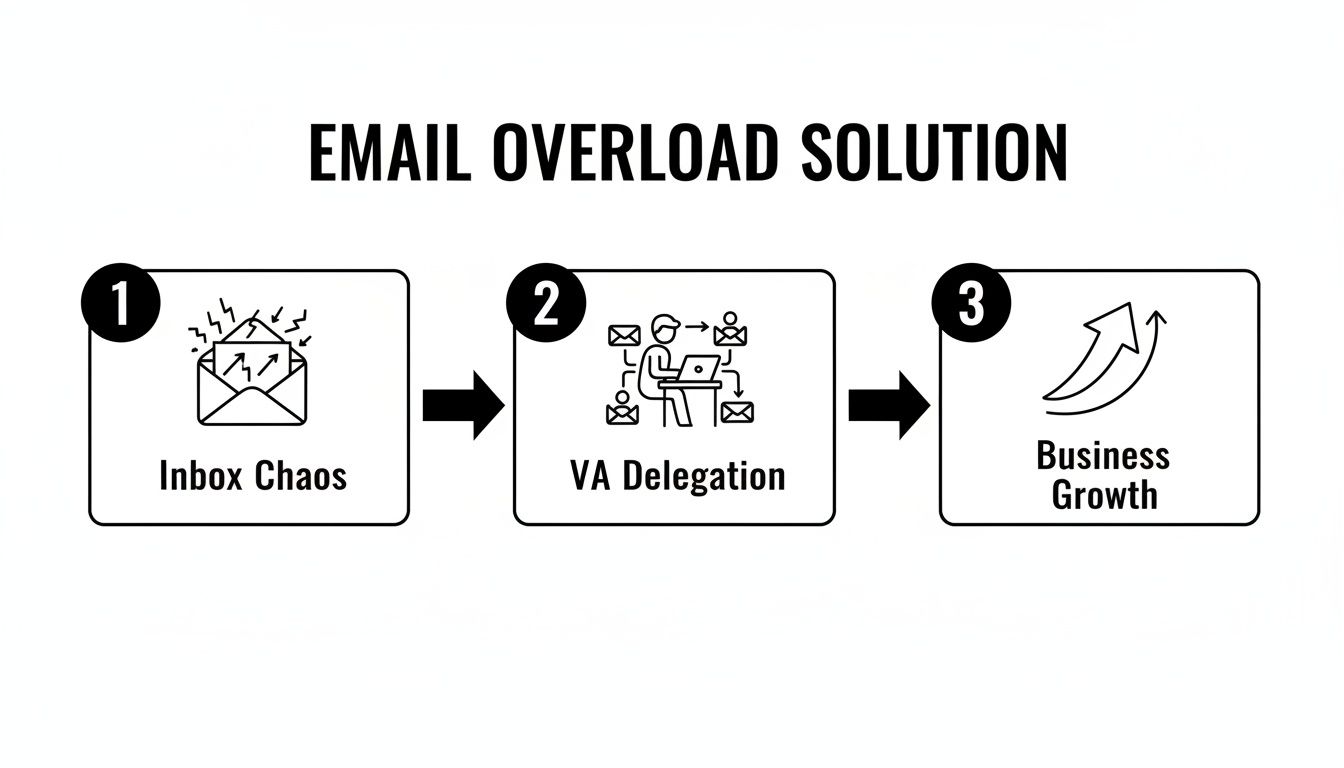
It perfectly illustrates the journey from complete inbox chaos to tangible business growth, all driven by smart VA delegation. This initial sorting is your first line of defense against the daily email onslaught.
Integrating AI for Smarter Routing
Once you have a human email management virtual assistant setting the strategy, you can layer in AI tools to get even more sophisticated. Platforms like SynthAI plug directly into Gmail or Outlook and use natural language processing to understand the intent behind an email, not just basic keywords.
> For instance, AI is smart enough to tell the difference between a customer asking, "Where is my order?" (a support ticket) and a potential partner asking, "How can I order in bulk?" (a sales lead). Both contain the word "order," but the intent is completely different.
This kind of advanced routing logic lets your VA build far more nuanced workflows. They could set up a rule where the AI drafts a standard reply for a common support ticket and simply holds it for the VA’s final approval. This alone can slash your response times.
This hybrid human-AI approach is the sweet spot. Automation handles the sheer volume, while your VA provides the critical thinking, strategy, and final quality check needed to maintain excellent communication. The goal is to build a system that sorts, prioritizes, and even pre-drafts responses, freeing up your entire team to focus on work that actually grows the business.
Crafting Smart Templates and Clear Escalation Paths
Automation is only half the battle. Your email management VA is there to do more than just sort messages—they're the frontline of your communication. This is where you need to equip them with the right tools: smart templates for consistency and crystal-clear escalation paths for when things get complicated.
Think of it this way: your VA handles the predictable so your core team can focus on the exceptional.

Templates are your secret weapon for speed and quality. They aren't meant to sound like a robot; they’re designed to provide quick, accurate, and on-brand answers to the 80% of routine questions that otherwise bog down your inbox. This simple step frees your VA to spend their time on conversations that actually need a human touch.
Building Out Your Template Library
The first thing your VA should do is a quick audit of your inbox to spot the patterns. For an e-commerce brand, these are usually pretty obvious. Work with them to draft a handful of clear, concise, and genuinely helpful templates for your most frequent inquiries.
A good starting point for any e-commerce or growth team includes:
- Order & Shipping Updates: Don't just rely on the default Shopify email. A custom template can add a personal touch, clarify what happens next, and set expectations on timing.
- "We Got Your Message" Replies: An instant, automated acknowledgment for support tickets does wonders for customer confidence. It buys your team time while assuring the customer they've been heard.
- Canned FAQ Responses: For questions you get constantly— "What's your return policy?" or "Do you ship to Canada?"—a template ensures everyone gets the same correct info, fast.
- Lead Nurturing Sequences: When a new lead signs up, a pre-written email sequence can warm them up automatically so no opportunity falls through the cracks.
> Pro Tip: Always use placeholders like `Customer Name` or `Order Number` to make your templates feel personal. The goal here is efficiency that doesn't feel cold or generic.
Once these are in place, your VA can fly through the bulk of the day's emails in minutes. They just grab the right template, add a touch of personalization, and hit send. It’s a game-changer for maintaining a professional and reliable brand image.
Designing Failsafe Escalation Paths
But what happens when a truly critical email hits? A template won't help with a furious VIP client, a legal notice, or an urgent warning that your site is down. For these high-stakes moments, you absolutely need a pre-defined escalation path.
This is just a simple protocol that tells your VA exactly who to notify and how to do it when an emergency pops up. It completely removes the guesswork. Your VA shouldn't have to agonize over whether an angry email is "important enough" to interrupt you. The rules make that decision for them.
Here’s what a simple but effective escalation flow looks like in practice:
1. Identify Trigger Words: The VA sets up a filter to watch for high-priority keywords. Think "legal," "complaint," "urgent," "server down," or even the name of a key client.
2. Tag It Immediately: Any email matching these terms automatically gets a bright, can't-miss-it tag, like **URGENT - ESCALATE**.
3. Send an Instant Alert: Using a tool like Zapier, the VA can create a rule that pings a specific Slack channel (e.g., `#inbox-alerts`) the second that tag is applied.
4. Add a Quick Summary: The VA’s final step is to drop a one-sentence summary of the problem into the Slack alert so the team has immediate context.
This entire process ensures the right people know about a critical issue within minutes, not hours. It gives your team the head start they need to jump on a problem before it spirals.
Implementing Ironclad Security Practices
Giving someone access to your inbox is a big deal. It's built on trust, but that trust needs to be backed up by smart security practices. Let's be clear: never, ever hand over your primary password. It’s a huge, unnecessary risk when there are much better ways to grant access.
The absolute best practice here is to use delegated access. Gmail has this feature built-in, and it’s a lifesaver. It lets your VA read, send, and manage messages on your behalf without them ever seeing your password. This should be a non-negotiable part of your setup, creating a secure wall between your core account credentials and their day-to-day work.
Establishing Legal and Operational Safeguards
Before you grant any access, your first move should always be a legal one. Get a Non-Disclosure Agreement (NDA) signed. This isn't just a formality; it's a legally binding contract that protects your business communications, customer lists, and any proprietary info that flows through your inbox.
An NDA establishes a professional boundary right from the start and gives you legal options if anything goes wrong. It’s a simple, powerful tool that I insist on using with any email management virtual assistant or contractor who will be handling sensitive data.
Next up, you need to be crystal clear about your data handling rules. Don't leave anything to interpretation. Document everything. This isn't just about what the VA can do, but more importantly, what they can't.
- No Local Downloads: Make it a rule that no customer data or sensitive files are ever downloaded to a personal computer.
- Secure Channels Only: Define how information gets shared internally. For example, all discussions about customer issues must happen in a secure platform like [Slack](https://slack.com/), not over personal text messages.
- Offboarding Protocol: Have a clear, immediate process for revoking all access the moment your working relationship ends.
> These policies aren't about micromanaging; they're about eliminating gray areas. When everyone knows the rules of the road, it ensures you and your VA are on the same page about protecting your company's most important asset: its data.
Understanding SOC 2 Compliance
When you're evaluating a virtual assistant service or a platform like SynthAI, keep an eye out for SOC 2 compliance. This isn’t just a marketing buzzword. It's a tough, independent audit that verifies how a company protects customer data. It goes far beyond a simple "we take security seriously" statement on a website.
A provider that has achieved SOC 2 certification has invested significant time and money to prove their systems are built to keep your information secure, private, and available. For any e-commerce business dealing with payment details or a SaaS company handling user data, this is absolutely critical.
Choosing a SOC 2 compliant partner means you’re working with someone who has built their operations on a foundation of enterprise-grade security. It's a powerful signal of trust and reliability.
How to Measure Your Email Management ROI
You’ve built out the workflows, written the templates, and locked down security. So, was it all worth it? The only way to know for sure is to measure the return on your investment.
Proving the value of an email management VA goes way beyond just counting how many emails they answer. It’s about connecting their daily work to real business results—things like revenue, team efficiency, and customer happiness. The right metrics will give you a clear, undeniable picture of the impact.

The best place to start is with speed and efficiency. Think of these as leading indicators. They’re the first dominos to fall, directly influencing everything from customer satisfaction to your team's bandwidth. To get a baseline, track a few core operational KPIs that show the immediate lift from having a VA managing your inbox.
Key Performance Indicators for Efficiency
- Average First Response Time (FRT): This is the gold standard for any customer-facing communication. A skilled VA can take your response time from a day or more down to under an hour. That alone sends a powerful message to customers that you’re on top of things.
- Ticket Resolution Rate: How many issues get completely solved on the first try? A high first-contact resolution rate means fewer frustrating back-and-forths, which saves everyone time and mental energy.
- Emails Handled Per Hour: This is a straightforward productivity metric. It helps you understand your VA’s capacity and lets you see their efficiency improve as they master your workflows.
> We've seen support leaders at many small and mid-sized companies get a 35% boost in efficiency just by delegating email triage. This isn't just about speed; it's about freeing up your core team to focus on the complex, high-value work that only they can do.
These efficiency wins are huge, but the real story unfolds when you connect them to business growth. For e-commerce and marketing teams, this is where the ROI becomes crystal clear. You need to draw a direct line from your VA’s email management to actual sales and lead conversions.
Connecting Email Management to Revenue
The booming global market for virtual assistants tells you a lot. Administrative VAs now make up a massive 31.5% of that market because they are central to growth. For e-commerce brands, this often means they can manage 35% more orders without hiring another full-time employee. For sales teams, faster lead responses can easily lift conversions by 20%. You can dig deeper into these trends with these virtual assistant statistics and insights.
To see this in your own business, you have to track conversion-focused metrics. If your VA is handling new inquiries from your website, make sure you're using tracking links or a CRM to see how many of those conversations convert into paying customers. It's a simple way to calculate the revenue lift from faster follow-ups.
And don't forget about customer retention. Swift, professional email support is one of the best ways to keep customers from churning. Track your churn rate before and after bringing on your VA. A noticeable drop is solid proof that your investment is paying off by keeping your hard-won customers happy.
With modern analytics dashboards, you can pull all this data into one place. This creates a visual link between your VA's daily grind and your company's bottom line, giving you a continuous feedback loop to refine workflows and ensure your email system is an engine for growth, not a bottleneck.
Got Questions? We've Got Answers
Stepping into the world of virtual assistants for email management usually sparks a few questions. It’s smart to get these sorted out before you dive in, so let’s tackle some of the most common things people ask when they're thinking about bringing on an email management virtual assistant.
Getting these answers upfront helps you move forward with confidence, knowing exactly what to expect.
So, What's This Going to Cost Me?
The investment can vary quite a bit, but it usually breaks down into two models: hourly rates or monthly retainers. You can expect to see hourly rates anywhere from $20 to $50+, which really depends on the VA's experience level and where they're located. On the other hand, a monthly retainer gives you a block of hours for a flat fee, which is fantastic for keeping your budget predictable.
But when you're looking at the numbers, don't just see a cost. Think about the return. Every hour a VA spends on low-value email tasks is an hour you get back to focus on what actually grows the business—sales, big-picture strategy, or product innovation.
> It’s less about the expense and more about the value of your reclaimed time. If a VA frees up 10 hours a week for you, what is that newfound focus worth to your business's bottom line?
What Does an Email VA Actually Do?
It's so much more than just tidying up an inbox. A talented virtual assistant can build a whole system to make your communications run smoothly. We're not just talking about deleting spam here; we're talking about strategic email management.
Here’s a glimpse into what they might handle on any given day:
- Triage and Prioritization: They’ll sort incoming mail into smart folders—think "Urgent," "Needs Action," or "For Your Info"—so you only lay eyes on what really needs your attention.
- Template-Based Responses: They can handle all the routine stuff, like answering FAQs or confirming appointments, using pre-approved templates. This keeps your responses fast and your brand voice consistent.
- Calendar Juggling: Scheduling meetings, sending out invites, and tracking RSVPs right from your inbox becomes their job, not yours. Your calendar stays neat and tidy without you lifting a finger.
- Inbox Decluttering: They’ll actively unsubscribe you from all that junk mail that creeps in, cutting down the noise so you can focus on what matters.
How Do I Get a VA Started The Right Way?
A strong partnership kicks off with a great onboarding process. You can't just hand over your password and hope for the best. You need to set your VA up for success with a clear "playbook" for your inbox.
Put together a simple guide covering your communication style, your preferred tone, and how you typically make decisions on common requests. Give them access to your brand guidelines and maybe a few real-world examples of how you've handled certain customer emails in the past.
Finally, set up regular, quick check-ins for the first few weeks. A 10-minute daily sync on Slack or a short call can iron out any wrinkles, answer their questions, and build a solid working relationship right from the start.
Ready to transform your inbox from a bottleneck into a growth engine? SynthAI coordinates a team of AI assistants, including Lumen for email, to automate workflows and give you back your day. See how SynthAI can streamline your business.
Ready to Transform Your Business with AI?
Build your AI team and start automating your marketing today.